Release: April 2026
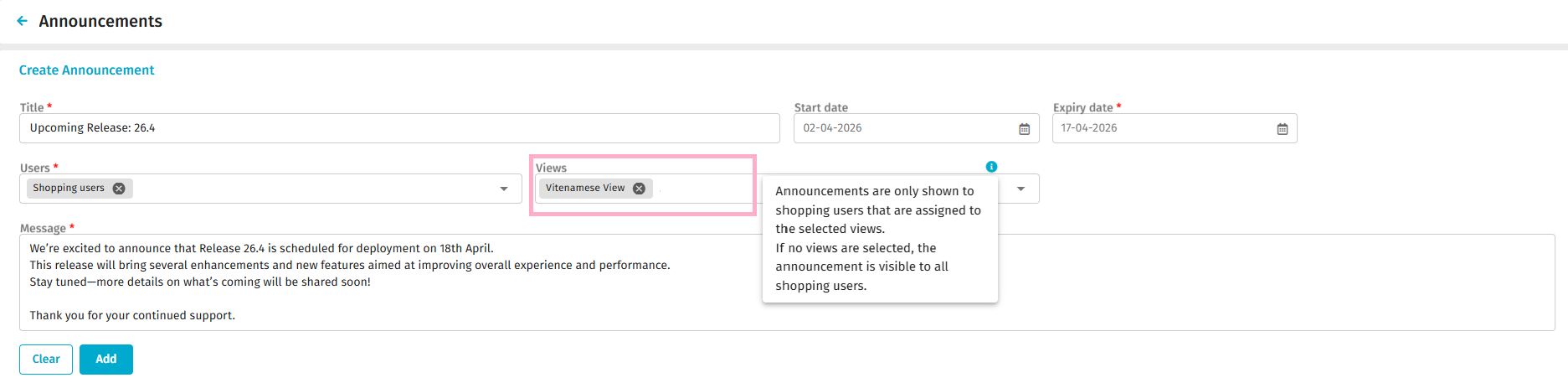
Admin users can control the visibility of Marketplace announcements by using Views linked to user groups in P2P Admin . When creating an announcement for Shopping Users, admins can select one or more views from the Views dropdown. The announcement is then shown only to users who belong to the user groups associated with those selected Views. This ensures announcements are visible only to relevant users, enabling more targeted and meaningful communication.
Why it matters
Previously, all shopping users within an organization could see every announcement, which often led to information overload and irrelevant messaging.
With view-based targeting, Admin users can ensure that only the intended audience receives specific communications.
What's New
-
- Admins can now restrict announcements to users in selected Views using a new multi-select Views dropdown.
- Only agreement views that the admin can manage are available for selection.
- The announcement will appear on the Shop Landing page for users in the selected views.
Who benefits
Admin users who want more control over who sees which announcements and shopping users will see announcements relevant to their user group or region.Where to find it
- Go to Organisation Management in Marketplace.
- Select Announcements.
- When creating an announcement for “Shopping Users,” use the new multi-select dropdown Views to choose “All” or specific views.